
MX™ Connect Reporting
Learn how to use MX™ Connect reporting to monitor portfolio and merchant activity, analyze funding, disputes, profitability, and export reports for review.
Introduction
The MX™ Connect Reporting Guide provides an overview of reporting capabilities within MXC. Reports help you monitor portfolio activity, track key performance indicators, and ensure transparency across your merchant base.
This guide has been updated to reflect the latest branding and functional changes, ensuring alignment with current business processes.
In this guide, you’ll find:
- An overview of available reporting platforms
- Core functionalities, including search, sort, grouping, filtering, exporting, and saving filters
- Updated platform references (removal of Paymentech, replacement of FirstData with Fiserv Omaha, Fiserv North, and Fiserv North Reporting)
- A dedicated section on Fiserv North Reports
- Priority VTX Reports for SMS Pin Debit
- Resources for support and further guidance
Reporting Platforms & Functions
Reporting Overview
MX™Connect reporting enables users to analyze activity at both the portfolio and merchant level to support operational oversight, reconciliation, risk management, and merchant support.
Reports are commonly used to monitor:
- ACH funding, delays, rejects, and suspended funds
- Settlement and clearing activity
- Disputes (chargebacks, retrievals, reversals)
- Reserve balances and adjustments
- TIN withholding
- Processor notes and exceptions
- Profitability and prepaid expense data
Reporting Scope
MXC provides reporting at two levels:
-
Portfolio-Level (Reports tab)
Aggregated views across your book of business
Retention: last 6 months -
Merchant-Level (within a merchant record)
Detailed, merchant-specific reporting
Retention: full history
Core Reporting Functions
All MX™ Connect reports share a consistent set of tools designed to make navigation and analysis efficient.
Standard Report Controls
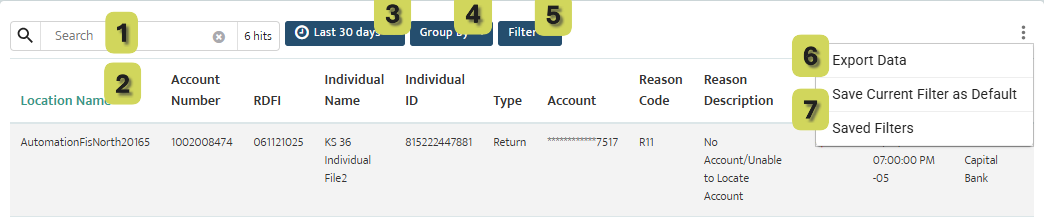
1. Search
Locate records using merchant name, merchant ID, or transaction attributes.
2. Sort
Click column headers to sort ascending or descending.
3. Time Picker
Filter data using preset ranges (e.g., 7 / 30 / 90 days) or custom date ranges.
4. Group By
Drag a column header into the grouping bar to organize data into expandable groups (e.g., by merchant, date, transaction type).
5. Filters
Apply field-level filters such as location name, transaction type, card type, account number, or status.
6. Export
Export the current result set to a spreadsheet (CSV) for offline analysis or reconciliation.
7. Saved Filters
Save a specific combination of filters and settings as a reusable view.
Saved Views can be shared across teams and optionally set as a default.
Best Practice:
Saved Views are ideal for recurring workflows such as funding exception reviews, dispute monitoring, and reconciliation audits.
Primary Processor Report Categories
The following report categories represent the core reporting foundation within MX™ Connect.
While individual platforms may differ slightly in structure or column naming, their intent and use cases are consistent.
Acquiring (TSYS) Reports
TSYS reports within MX™ Connect support risk review, funding oversight, profitability analysis, and expense tracking. These reports are commonly used by operations, finance, and risk teams to research exceptions and validate merchant performance.
Acquiring (TSYS) – ACH Suspended (Funding Held)
Purpose
The ACH Suspended report provides visibility into merchant funding that has been held, released, or adjusted due to risk, settlement, or reserve activity.
This report is primarily used to understand why funds were suspended, the current status of those funds, and whether action has already been taken.
What This Report Is Used For
- Reviewing merchant accounts with ACH suspense activity
- Determining whether funds are currently held or released
- Identifying the type of suspense event
- Supporting merchant inquiries regarding delayed or missing deposits
Key Insights & Interpretation
- Suspense Status indicates whether funds are still being held or have been released.
- Type filtering allows users to isolate specific suspense scenarios, including:
- Transfer of Funds on Reserve
- Calculated Reserve
- One-Time Release
- Record Adjustment Release
Negative amounts (displayed in red) indicate funds that were taken from reserves.
- Transfer of Funds refers to funds applied to cover a balance due to PPS.
- One-Time Release refers to funds released outside of PPS, typically directly to the merchant.
Research & Investigation Tips - Review merchant history notes to gain additional context around the suspense event.
- Use filtering to quickly isolate high-risk or recurring suspense activity.
- This report is best used as a research tool, not an action-based workflow.
Acquiring (TSYS) – ACH Suspended Detail View
Purpose
The detail view allows users to drill into a specific suspense entry for deeper investigation.
How to Use
- Double-click any entry to open expanded details.
- Review the Memo section to understand the reason for the suspense event.
- Review Client Notes for additional context, explanations, or internal decisions related to the hold or release.
Best Practice
Use the detail view when responding to:
- Merchant funding questions
- Risk escalations
- Internal reconciliation discrepancies
Acquiring (TSYS) – Profitability (PPM Daily or Monthly)
Purpose
The Profitability (PPM) report provides insight into merchant profitability performance over time.
What This Report Is Used For
- Evaluating daily or monthly profitability trends
- Supporting portfolio performance analysis
- Identifying underperforming or high-value merchants
- Informing pricing, retention, or risk decisions
Common Use Cases
- Monthly portfolio reviews
- Executive reporting
- Strategic account management
Notes
- This report is typically reviewed at an aggregate level rather than transaction-by-transaction.
- Filtering by date range allows comparison across periods.
Acquiring (TSYS) – Prepaid Expense
Purpose
The Prepaid Expense report provides visibility into expenses paid in advance on behalf of merchants.
What This Report Is Used For
- Tracking prepaid costs associated with merchant accounts
- Supporting accounting and expense reconciliation
- Validating expense allocation over time
Common Use Cases
- Finance and accounting reviews
- Audit preparation
- Expense forecasting and reconciliation
Fiserv Omaha Reports
Purpose
Provide visibility into transaction activity, clearing, settlement, and funding for merchants processing on Fiserv Omaha.
What These Reports Are Used For
- Settlement and funding reconciliation
- Clearing and captured transaction review
- ACH funding delays and rejects
- Downgrade and interchange research
- Transaction exception investigation
Primary Users
- Operations teams
- Finance and reconciliation teams
- Support teams handling merchant inquiries
Fiserv North Reports
Purpose
Deliver detailed reporting for merchants processing on Fiserv North, including funding cycles and reserve activity.
What These Reports Are Used For
- Monitoring settlement timing and funding cycles
- Reviewing reserve balance impacts
- Identifying rejected or adjusted transactions
- Supporting financial reconciliation and risk analysis
Primary Users
- Finance
- Risk management
- Portfolio operations
MX™ Connect Applications – Merchant Experience
As shown in the MX™ Connect Applications – Merchant Experience section of the Product Demo, reporting also extends to merchant-facing visibility .
MX Merchant (MXM) Reports
Purpose
Provide merchants with self-service reporting through the MX Merchant portal.
Capabilities
- Transaction and batch history
- Settlement and funding results
- Dispute and chargeback visibility
- Data export for merchant internal use
Key Distinction
- MX™ Connect: Portfolio and processor-level oversight
- MX Merchant: Merchant-specific, customer-facing transparency
Updated 30 days ago